
30-Second
| AMP (Accelerated Mobile Pages) is Google’s open-source framework for building stripped-down, fast-loading mobile web pages, launched in 2015. Short answer for 2026: for most business sites, no, you don’t need it. Google dropped the requirement for Top Stories in 2021 and now ranks pages on Core Web Vitals instead. It still earns its keep for high-volume publishers, news sites, and content networks pushing thousands of simple article pages to mobile-heavy, low-bandwidth audiences. For SaaS, ecommerce, and service businesses, the restrictions on JavaScript, design, and analytics usually cost more than the speed is worth. If you’re chasing AI citations through AEO or GEO, a clean, fast, machine-readable page beats this framework every time. It was never built with AI crawlers in mind. |
I get asked whether should I use AMP more than you’d expect for a framework Google quietly stopped pushing years ago. The honest answer is that it’s not dead, it’s just not for you anymore, unless you fit a fairly narrow profile.
What Is AMP (Accelerated Mobile Pages)?
AMP stands for Accelerated Mobile Pages. Google launched it in 2015 as an open-source project to fix a real problem: mobile pages were bloated, slow, and loaded with blocking scripts.
The idea was simple. Strip the page down to a restricted version of HTML, limit JavaScript, and serve it from a cache so it loads almost instantly.
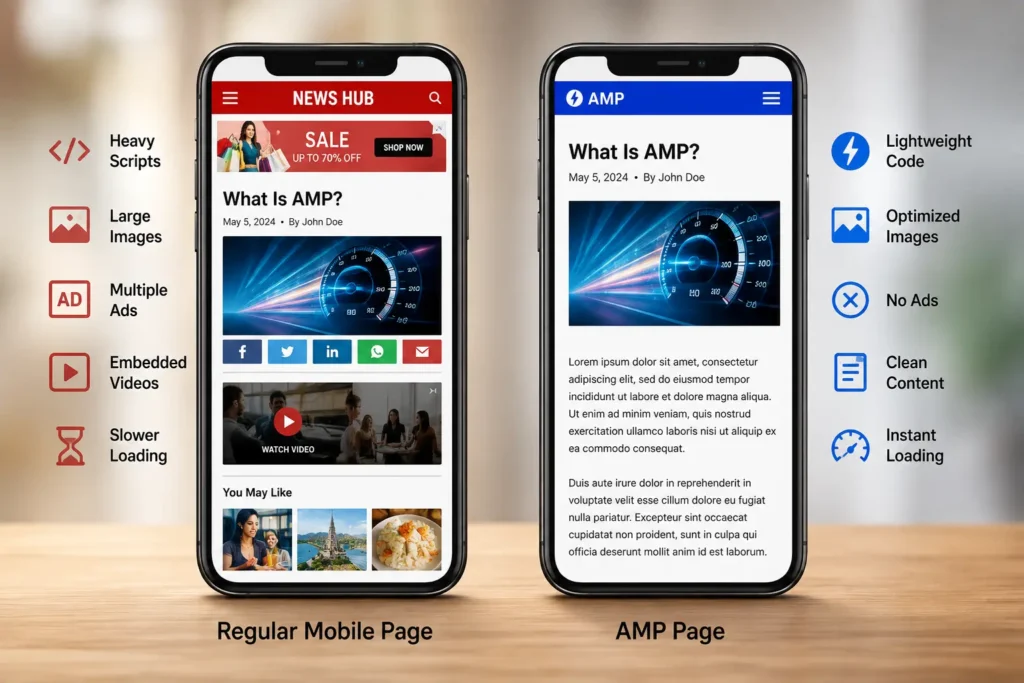
The framework runs on three parts working together.
- AMP HTML: a stricter version of standard HTML that blocks arbitrary scripts and swaps normal tags for framework-specific ones, like amp-img instead of img.
- AMP JavaScript: a controlled runtime that manages how resources load, so nothing on the page can block the content from rendering.
- AMP Cache: a content delivery layer, most famously Google’s, that stores validated pages and serves them over HTTPS almost instantly.
That combination made these pages genuinely fast. It’s also exactly why they feel limited the moment you want to do anything beyond publish text and images.
A Short History: Why AMP Existed in the First Place
Back in 2015, mobile page speed was a genuine crisis. Sites were shipping desktop-weight pages, heavy ad scripts, and unoptimized images straight to phones, and users on 3G connections paid for it in load time.
Google’s response was to launch an open-source project, backed by publishers and platforms, that traded design freedom for guaranteed speed. For a few years, this trade felt worth it.
Between 2016 and 2020, adoption exploded, mostly because Google required it for placement in the Top Stories carousel. News sites had a direct financial reason to build compliant pages, so most of them did.
Then two things changed. Google rolled out Core Web Vitals as a general page experience signal in 2020, and by mid-2021 it removed the Top Stories requirement entirely. Any well-optimized page, with or without the framework, could now compete for that same visibility.
That’s the shift most outdated guides still miss. The badge, the requirement, and the built-in advantage are gone. What’s left is a tool that still works well in a narrower set of situations.
Is AMP Still Relevant for SEO in 2026?
Sometimes, but for a shrinking slice of the web. If you’re evaluating AMP SEO value today, weigh it against Core Web Vitals rather than against nothing.
It is not a ranking factor on its own. It never technically was. What it did was make it easier to hit good scores on mobile page speed, and that speed feeds into the page experience signals Google does care about.
You can hit those same scores today without it, using modern hosting, image compression, and a disciplined script budget. That’s the whole shift in one sentence: this framework used to be a shortcut to speed, and now speed has other shortcuts.
How Does AMP Work, From Build to Delivery?
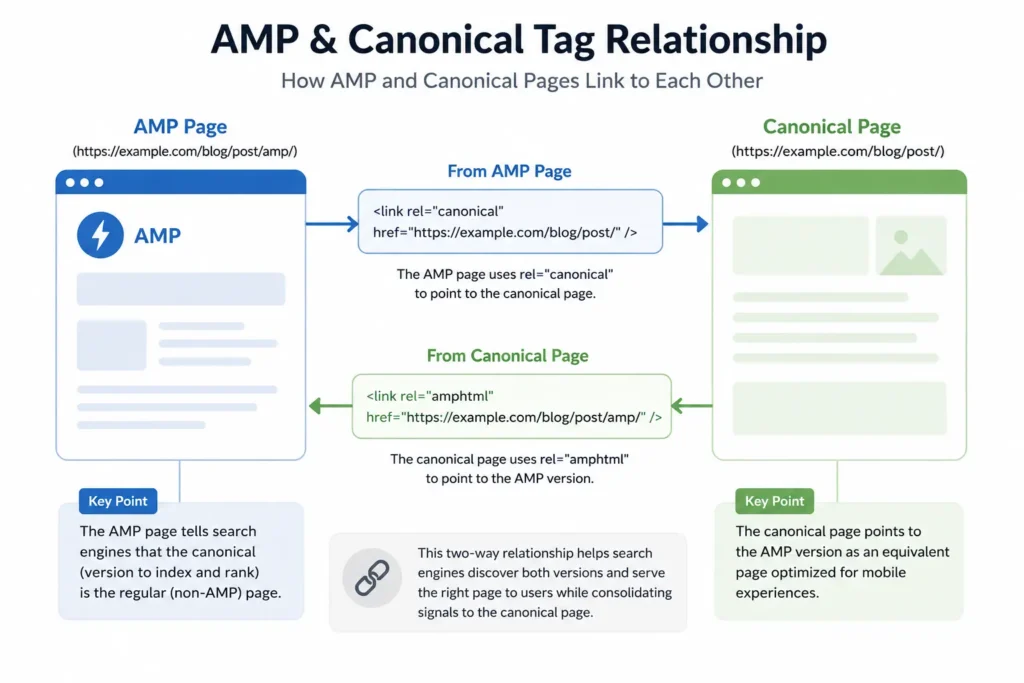
A basic workflow looks like this: a developer builds the page using the restricted markup, links it to the standard version with canonical tags, validates it against the framework’s rules, and lets a cache serve it to visitors.
| Step | What Happens |
| Build | Page is written in AMP HTML with approved components only |
| Link | The lightweight page points to the canonical (main) version, and vice versa |
| Validate | The AMP Validator checks the page follows the framework’s strict rules |
| Cache | A CDN, often Google’s AMP Cache, stores and pre-loads the page |
| Serve | Visitors get a near-instant load from the cached version |
The canonical linking step trips people up constantly. Get it wrong, and you’re creating duplicate content instead of a faster page.
On the standard page:
<link rel=”amphtml” href=”https://example.com/page/amp/”>
On the accelerated page:
<link rel=”canonical” href=”https://example.com/page/”>
What Are the Benefits of AMP Pages?
The benefits are real, they’re just narrower than they used to be.
- Genuine speed on weak connections. These pages stay lightweight by design, which still matters for users on older phones or patchy mobile networks where every kilobyte counts toward load time.
- Built-in Core Web Vitals wins. The restrictions that make this framework annoying also make it hard to accidentally tank your Largest Contentful Paint or Cumulative Layout Shift, since heavy scripts simply aren’t allowed in the first place.
- A caching advantage. Pages served from the AMP Cache can load close to instantly, since much of the rendering work happens before the visitor even taps the link.
- Simpler ad delivery for publishers. The performance-first model was built with ad-heavy news pages in mind, and it can still help viewability when it’s implemented well, since slow ad scripts are exactly what it was designed to block.
What Are the Drawbacks in 2026?
The drawbacks are why most business sites have quietly walked away.
- Design gets flattened. Custom layouts, interactive tools, calculators, and branded page experiences don’t fit the restricted component set this framework allows.
- JavaScript is heavily restricted. Chat widgets, personalization scripts, and third-party tools that rely on custom code often break or need clunky workarounds to function at all.
- Analytics gets messier. The framework uses its own analytics components, and reconciling that data with your standard site’s data takes real setup work most teams underestimate.
- You’re maintaining two versions of everything. Every page update now means updating both versions and keeping them in sync, which adds ongoing overhead with no expiration date.
- Monetization gets constrained. Header bidding and some ad formats behave differently inside a restricted script environment, which can quietly cut into publisher revenue.
For a lead-generation site, a demo page, or a checkout flow, these trade-offs usually outweigh the speed gain. For a landing page you’re actively trying to convert, I’d rather fix the fundamentals than bolt on a framework built for news articles.
Does This Still Matter for AI Search and AEO?
This is the question most articles on the topic skip, and it’s the one I get asked most now.
The framework was never designed with AI crawlers or agentic search in mind. It predates ChatGPT, Perplexity, and Google’s AI Overviews by years. What AI systems actually reward, clean structured data, fast real-world load times, and content that’s easy to parse, overlaps with its original goals but doesn’t require the framework itself.
If your real goal is showing up in AI answers, I’d point you toward what AEO actually requires instead. Specifically, that means passing Core Web Vitals, mobile-first design, and clean schema markup.
A fast, well-structured standard page satisfies an AI crawler just as well as a stripped-down one does, without the maintenance overhead of running two versions of every page.
Who Should Still Use AMP in 2026?
Match your situation to one of these before you decide anything.
Keep or consider it if:
- You run a high-volume publisher or news site with simple, mostly-text article templates.
- Your audience is heavily mobile and concentrated in regions with slow or unreliable networks.
- You have development resources to maintain two versions of every page without letting them drift out of sync.
Skip it if:
- You run a SaaS, ecommerce, or service business where conversion paths, filtering, or interactivity matter.
- Your current mobile pages already pass Core Web Vitals without any special framework.
- You don’t have the team bandwidth to maintain a second version of your site indefinitely.
Most of the businesses I work with land in the second group. If that’s you too, the better investment is almost always a faster core website built around mobile-first design rather than a parallel build.
How Do You Remove AMP Without Losing Traffic?
If you’re already running it and want out, treat this as a migration project, not a toggle switch.
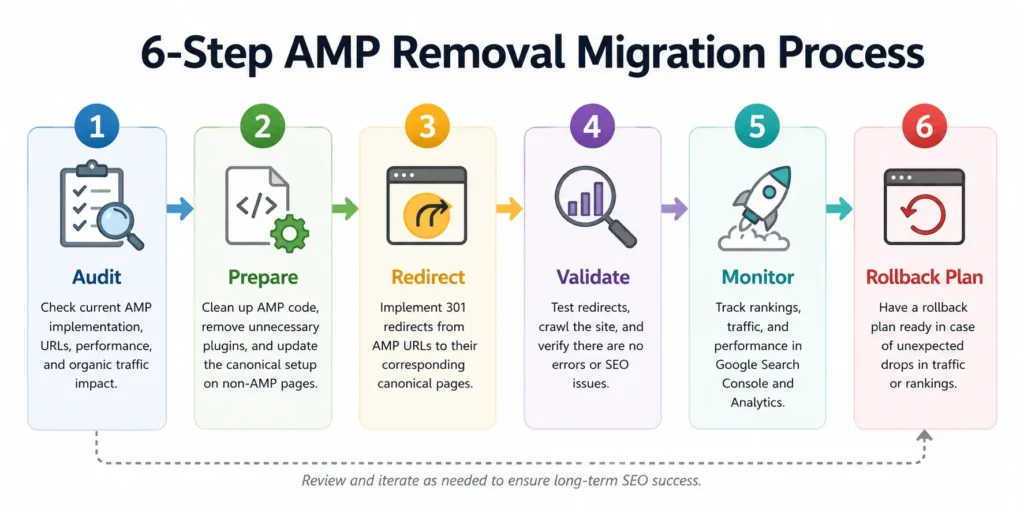
- Audit what you have. List every lightweight page and pull its traffic and conversion data before you touch anything.
- Confirm your standard pages are ready. Check load speed and stability metrics on the canonical versions. They need to perform at least as well as the accelerated versions before you cut over.
- Update your canonical and amphtml tags. Remove the framework-specific links once you’re ready, and make sure the canonical page is the one search engines should index.
- Set up redirects where needed. If old URLs are being fully removed rather than just unlinked, 301 redirect them to the standard version.
- Watch Search Console closely. Monitor indexing, mobile usability, and Core Web Vitals reports for a few weeks after the change.
- Keep a rollback plan. If organic traffic drops sharply and you can’t explain why, you want an easy way back while you investigate.
This is deliberately boring work. Boring beats losing organic traffic during a migration you didn’t need to rush.
AMP vs Core Web Vitals vs PWA: Quick Comparison
| AMP | Core Web Vitals Optimization | Progressive Web App | |
| What it is | A restricted page framework | A set of performance metrics to hit | An installable, app-like web experience |
| Design freedom | Low | Full | High |
| Ranking impact | Indirect, via UX signals | Direct ranking factor | Indirect, via UX signals |
| Best fit | News, high-volume publishing | Almost every website | Ecommerce, content apps wanting app-like engagement |
| Maintenance | Two versions to keep in sync | One site, ongoing tuning | One codebase, more setup complexity upfront |
A PWA solves a different problem entirely: it’s for teams that want an app-like, installable experience, not just a faster page load.
Frequently Asked Questions
What does AMP stand for?
AMP stands for Accelerated Mobile Pages, Google’s open-source framework, launched in 2015, for building fast-loading, stripped-down mobile web pages.
Is AMP dead in 2026?
Not dead, but no longer the default. Google removed the Top Stories requirement in 2021, and most publishers, including major ones, have since moved to standard pages optimized for Core Web Vitals instead.
Does using this framework help my Google rankings?
Not directly. It is not and never was a standalone ranking factor. Any ranking benefit comes indirectly, through faster load times and better user experience signals that Core Web Vitals already measures.
Should a small business website use AMP?
Usually no. Most small business sites don’t have the page volume or the low-bandwidth audience that makes the trade-offs worthwhile. A fast standard site with solid mobile-first design is simpler to build and maintain.
Can I remove it without hurting my SEO?
Yes, if you do it carefully. Confirm your standard pages meet Core Web Vitals first, update your canonical tags, redirect any removed URLs, and monitor Search Console closely for a few weeks after the change.
Is this the same as a Progressive Web App (PWA)?
No. One restricts a page to load fast within normal browsing. A PWA is a more involved, installable, app-like experience with offline support and richer interactivity, which the original framework was never designed to provide.
Bottom Line
AMP did what it was built to do back in 2015: it forced the mobile web to get faster at a time when that badly needed to happen. That job is largely finished.
In 2026, Core Web Vitals do the same work this framework used to do, without asking you to maintain two versions of your site or give up design flexibility. Unless you’re running a high-volume publisher with a genuinely mobile, bandwidth-constrained audience, I’d spend the effort on your core website instead.
If you’re not sure which side of that line your site falls on, that’s exactly the kind of technical call I help clients make in a technical SEO review.